


The BIM process now represents a reality that is gradually consolidating in the design and management property panorama.
Integrated design and graphic outputs, such as Render and VideoRender, are often notthe result of a single process. Then, how can you stand in a panorama of software thattake advantage of the modeling already carried out for BIM design?
In answer come different solutions, with the widest and rosy promises, but it is necessary to study in depth the potential of the tools, and rationalize the choices according to the desired output and also the costs to be faced.


Rendering in BIM
In the wide range of rendering software we use, the case study we’re going to analyze concerns Enscape.
Created in 2015, Enscape software rapresents the perfect match between the needs and desires of every designer and BIM expert.
Enscape also has plugins dedicated to interface with the most used BIM modeling software, such as ArchiCAD, Vectorworks and Revit, and offers the possibility to interface with the most popular modeling software, including Rhinoceros 3D and SketchUp.
Enscape is mainly developed for architectural visualization in Real-Time rendering.
It returns the graphic information without loss of details, having the parameters and LOD developed in BIM modeling, showing realistically the appearance of the materials in a very short time.
The Real Time Rendering
But why are we talking about Real-Time rendering?
Any software that is only aimed at rendering modeling content needs to be exported in the appropriate format; this can be done manually or through dedicated applications that can be installed in the BIM software, lengthening, even slightly, the time for a realistic graphic visualization.
The Real-Time rendering is stronglyplaced in the middle between the modeling and the rendering process, giving back a realistic graphic visualization at the same time as the modeling, having a direct link with the BIM software, and showing the result instantly; this also allows you to have a realistic view always as perfectly updated as the model, without necessarily having to go through the export process again.
Enscape, through its free plugin available for modeling software, allows with a keystroke to start the rendering in Real-Time showing the result of the changes immediately, keeping itself constantly updated.


The limit that Enscape has against the impossibility to modify the materials of the model outside the BIM software used has, as a second consequence, the advantage of “imposing” to the modeler a correct graphic setting of materials, textures and lights from the beginning, anticipating the work of choosing some color and composition solutions.
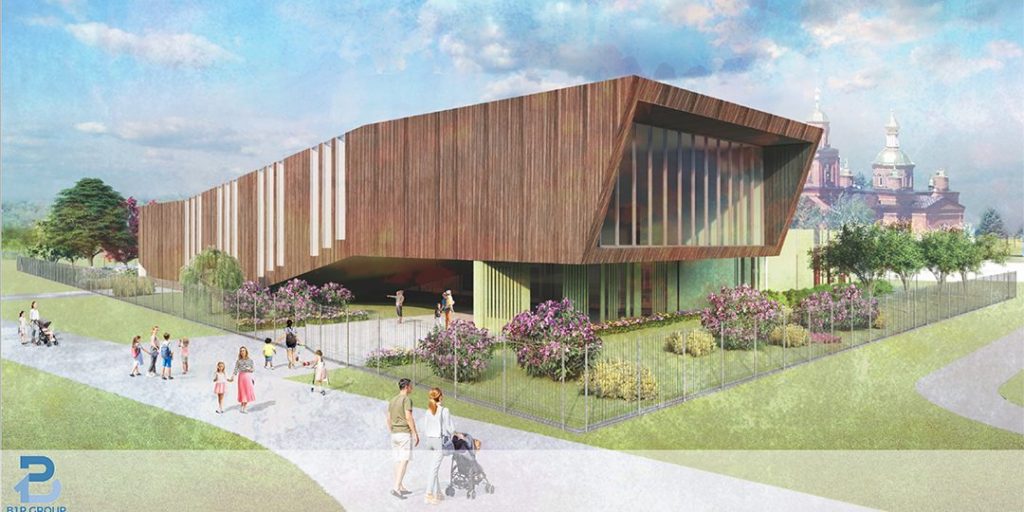
Case Study – Design of a School in Russia
To be able to speak with awareness of the advantages and limitations of a software, you must have studied and used it in relation to a project.


Here below you can see the use of Autodesk Revit BIM modeling software, which features the direct link plugin with Enscape, appearing on Revit with a dedicated Ribbon.

In the shown project, among the software tools used for modeling, Enscape represented the solution adopted for rendering, considerably speeding up the design process.

After modeling and rendering, you will need to work the images properly with the appropriate editing tools such as Adobe Photoshop to achieve the desired result but, being able to count on a very good and solid basis, the process is fast and immediate.


Enscape also allows you to export material IDs and masks, as well as lights for immediate layer selection in Photoshop, making the post-production process even faster.


Pros & Cons
An in-depth analysis of a software allows you to have the necessary information to decide whether and how to include this tool in the project workflow. It is not necessary to limit oneself to using a software “by hearsay”, but it is necessary to deepen the study of the subject and of the offers of each single tool.
Enscape’s many PROs include:
- The price, probably the lowest on the market and the absolute best quality/price ratio
- Ease of use, with an extremely intuitive interface for navigation
- The great speed of execution, however, also depends on the hardware you have at your disposal
- The possibility to furnish the model with elements of a rendered library
- The ability to create 360° renderable stills that can be viewed from any device
- The ability to dive into the model using a Headset
Among the cons, however, the most relevant in our opinion are:
- It is impossible to edit materials within Enscape, they must therefore be correctly set in the modeling software, including textures
- The difficulty in creating representative model videos
- The limit of the Asset library that does not differentiate between them more objects of the same category (as an example, inserting a tree, this will always be identical each time you’ll use it also in different points of the model, exception made for the taxable rotation from the BIM software)
- The inability to create dissected views directly inside Enscape
- The impossibility of modelling the context by digging or raising the topography
Link : b1pgroup.com